A modern client for DragonRealms — on your desktop, or right in your browser. A map that draws itself, experience and inventory at a glance, native script support, and weather that moves across the window as you play.
Built for real play — not just a thin wrapper around the raw telnet stream.
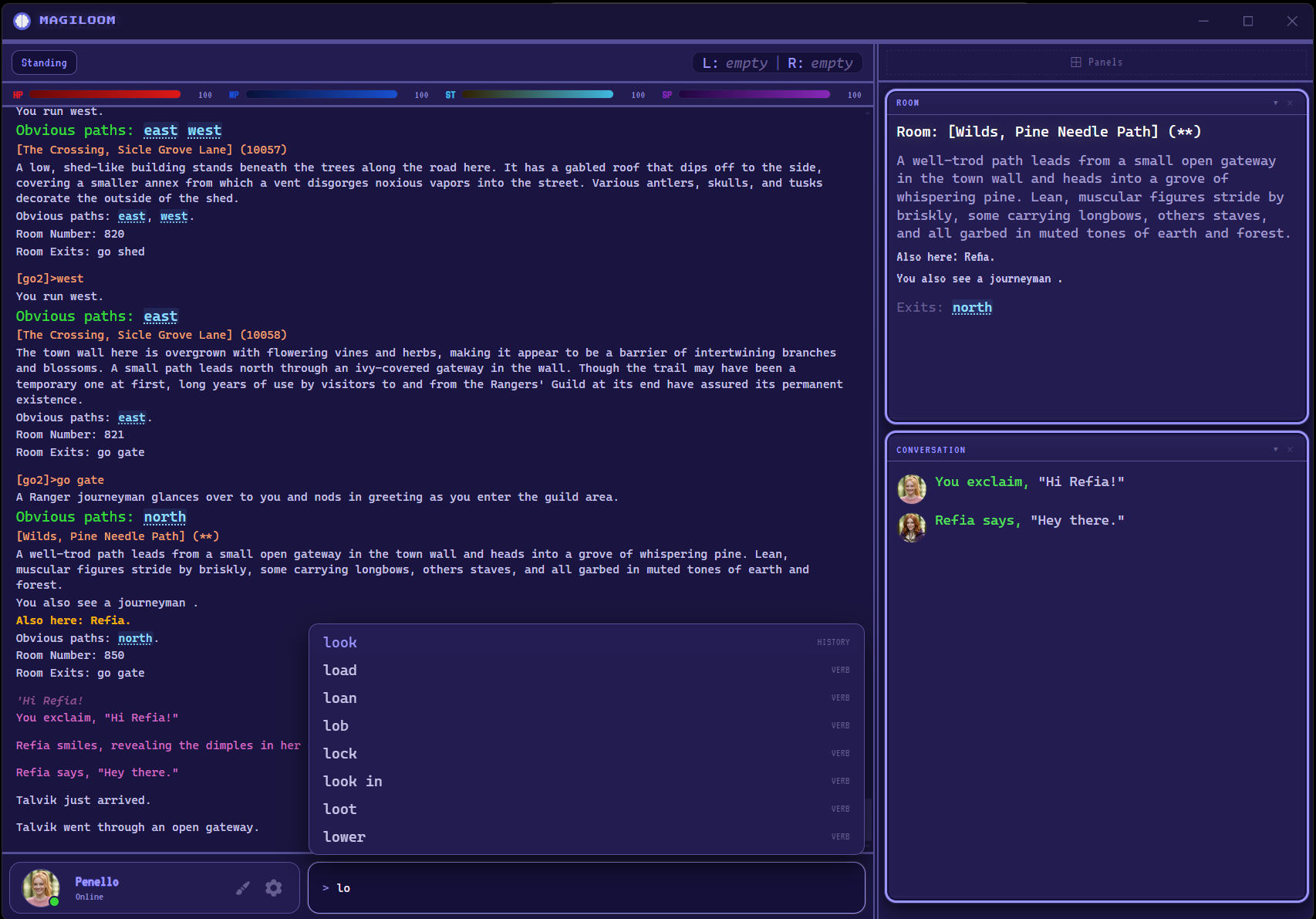
Full DragonRealms XML stream parser. Vitals, roundtime, room data, active spells, indicators — all updated live as you play.
A live map that draws itself as you explore, using the room IDs the game sends. Click any room to walk there. Imports and exports Genie map files, and every explorer's mapping accumulates into one shared world map.
Every skill's rank and learning state at a glance, with ranks gained this session, plus circle, TDPs, favors and overall mind state. Pairs with a log analyzer and TDP planner in Tools.
Your whole inventory as a sortable table or cards — worn, held and stowed, with nested containers, item counts and carried weight rolled up per container.
A built-in script engine that runs Genie and Wizard .cmd scripts natively — no Lich required. The Scripts panel shows what's running and lets you stop it. Lich still launches straight from the login screen when you want it.
Regex or plain-text highlights with custom colors, plus Genie-style aliases and triggers with class toggles. Import your existing Genie config and keep the setup you already have.
A body figure showing every wound and scar by location and severity, so you can see what needs tending without reading a wall of text. Empaths can switch it to their patient.
Elanthian day and night, weather and locale wash gently over the game window — rain, snow, forge embers, moonlight. Optional procedural ambient sound to match. Turn any of it off.
Drag panels to any height from the top or bottom edge. Slide the divider between game output and sidebar left or right. Your layout is saved per character, automatically.
Install it on Windows, Mac or Linux, or play in the browser on any device. Add it to your phone's home screen for a full-screen app with push notifications when someone speaks to you.
Lantern, Bloodstone, Thornwood, Ashfall, Discord, Rose Quartz, Prism, and Phosphor — or Final Fantasy. Each with a full color palette for health, mana, speech, warnings, and more. Ashfall comes in both light and dark, switchable from the character bar.
New releases download silently in the background. A banner appears when the update is ready — no manual downloads or reinstalls needed.
An always-on vitals bar up top, plus panels for your current room, experience, active spells, conversation log (with player avatars), combat stream, atmosphere, deaths, and inventory — each panel you can show, hide, and resize.
Color-code anything: your name, enemy attacks, loot drops, incoming messages. Regex patterns supported. Clickable exit links let you move with one click.
Free and open source. Play instantly in your browser, or install a native build.
The browser version runs your game session on the Magiloom server, which means your settings, scripts and logs need a home that belongs to you. A free Magiloom account gives them one — and keeps them in sync across every device you sign in on.
Logs are always yours to read and download, on any plan. Premium changes how long we keep them, never whether you can reach them.
No config files to edit. Open it in your browser or install it, log in with your DragonRealms account, pick your character, and you're in.